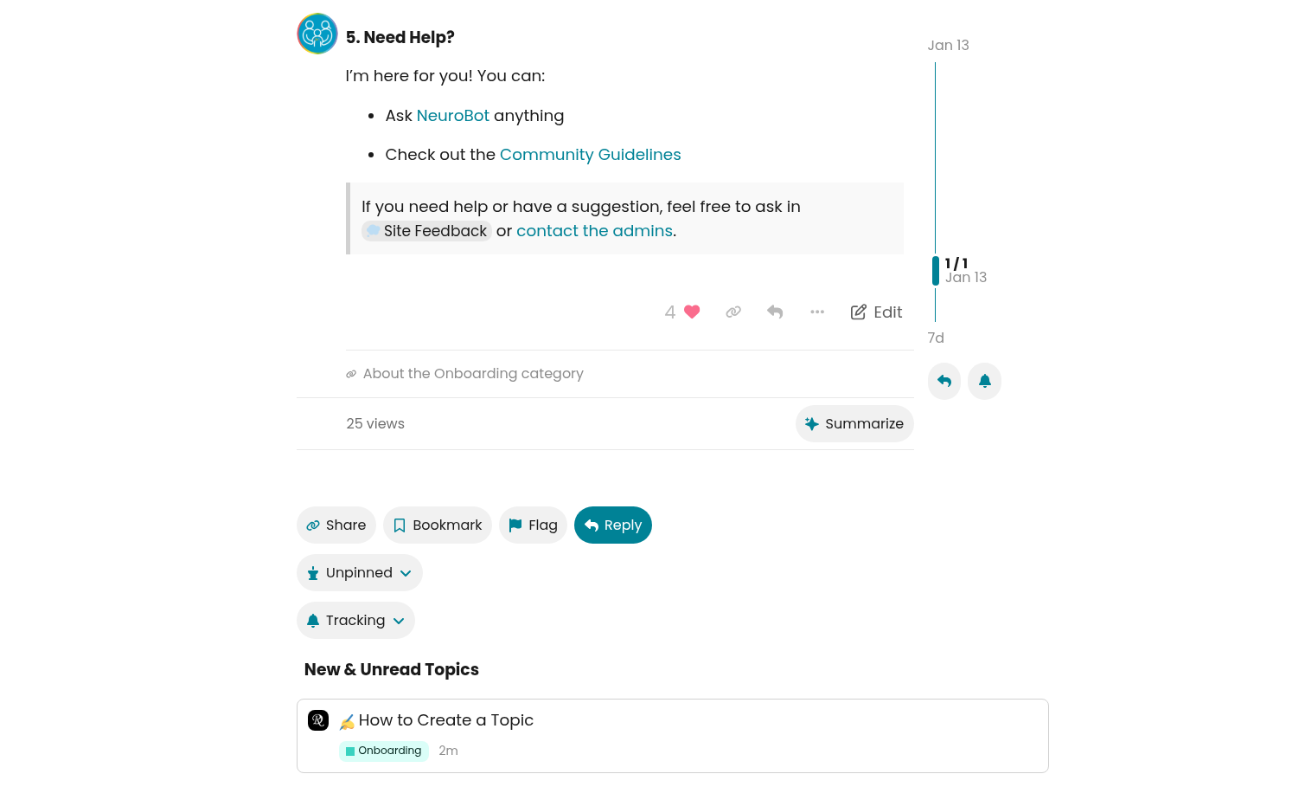
 How to Join a Discussion
Found an interesting topic? Here’s how to get involved:
Reacting to a Post
 Like – Show appreciation by clicking the heart. The number shows how many people liked it.
 Share Link – Copy a direct link to the post to share with others.
 Reply – Respond directly to a specific post (your reply links back to it).
 Edit – Made a typo? Edit your own posts anytime.
••• More Options – Access additional actions like flagging or bookmarking.
Topic-Level Actions
At the bottom of every discussion, you’ll find:
Share – Share the entire topic via link or social media.
 Bookmark – Save the topic to read later. Find it in your User Menu.
 Flag – Report inappropriate content to moderators.
Reply – Add your thoughts to the discussion.
 Unpinned/Pinned – Pin important topics to the top of your list.
 Tracking – Control notifications:
- Watching – Get notified of every new reply
- Tracking – Get notified only when someone mentions you
- Normal – Only see in your feed
- Muted – Hide from your feed entirely
Smart Features
 Summarize – Let AI create a quick summary of long discussions!
 New & Unread Topics – See related discussions you might have missed.
Pro Tips
 Quote someone by selecting their text before clicking Reply
 Use Summarize to catch up on long threads quickly
- Set Tracking to “Watching” for topics you care about